Transform Your Landscape Photos with These Luminar AI Templates
Why Your Landscape Edits Need a Smarter Starting Point
Every photographer who shoots landscapes knows the feeling. You come back from a hike or a trip with a memory card full of images that held so much promise. The light was perfect, the composition was instinctive, but when you open the files on your computer, something is off. The sky looks a little flat, the colors are muted, and the emotional impact you remember just isn't there. You start moving sliders—vibrance, clarity, shadows—and suddenly you've spent twenty minutes on a single photo and still aren't happy. This is the editing bottleneck, and it's where creative momentum goes to die.
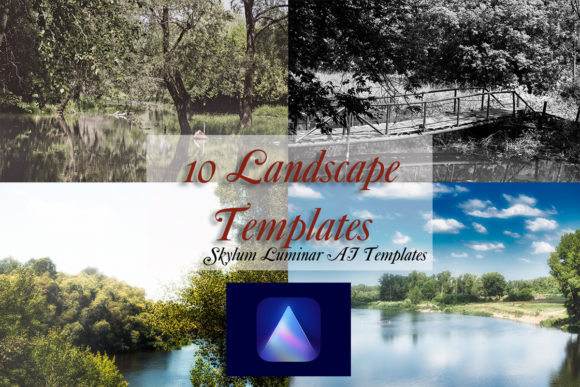
Skylum Luminar AI changed the game with its template-based approach, using artificial intelligence to analyze your image and suggest powerful, one-click edits. But even within Luminar AI, having a curated, professional set of starting points can make all the difference. That's precisely the value of a dedicated 10 Skylum Luminar AI Landscape Templates pack. This isn't a random collection of presets; it's a focused toolkit designed to solve the most common landscape photography challenges. Each template is a carefully calibrated response to specific lighting conditions, color palettes, and compositional needs, giving you a professional-grade foundation in seconds.
What's Inside the Pack and How It Works
When you download this 10 Skylum Luminar AI Landscape Templates pack, you get a .ltc file ready to import directly into your Luminar AI library. The process is straightforward, and the included "How To Use Guide" ensures you're up and running immediately. The real magic, however, lies in the versatility of the ten templates themselves. They are pre-tested on a wide range of landscape photos, from misty mountain mornings to vibrant coastal sunsets, ensuring reliability. Think of them not as a final filter, but as a skilled assistant who has already done the heavy lifting. You use them as a basis for working with an image, and then make small adjustments to find the perfect settings for your unique shot.
Here’s a glimpse of the visual personality and practical application of these templates:
- For Moody Atmosphere: Some templates enhance fog, deepen shadows, and introduce cool, desaturated tones. They excel at turning a flat, hazy scene into a dramatic, evocative image with strong visual hierarchy. This style works beautifully for editorial design in travel magazines or for creating a consistent, serious brand identity for a photographer specializing in fine art.
- For Vibrant Pop: Other templates are built to maximize color and clarity. They intelligently boost the saturation of greens and blues without making skin tones look unnatural (if people are in the frame) and add a crisp mid-tone contrast. This is your go-to for social media graphics, blog headers, or any project where you need the image to grab attention instantly in a busy feed.
- For Golden Hour Glow: A subset of the pack focuses on enhancing the warmth and soft light of sunrise or sunset. They protect highlight details in the sky while gently lifting shadows to reveal foreground details, creating a balanced, inviting feel. This style is perfect for web design hero images for lifestyle brands, travel agencies, or outdoor companies aiming for a warm, approachable brand perception.
The key to using these design assets effectively is to view them as a starting dialogue with your photo. After applying a template, ask yourself: Does the sky need more drama? Should the foreground be brighter? Luminar AI's sliders are still there for you to refine the AI's suggestions. This combination of intelligent starting points and manual control is what makes the workflow so powerful. It saves you from the "blank canvas" problem and lets you focus on the creative refinements that make the image yours.
Choosing the Right Template for Your Project
With ten options, how do you choose? It comes down to the story you want your image to tell and the context where it will live. Consider the emotional tone first. A template that adds cool, misty tones might be perfect for a meditation app's background but less suitable for a sunny vacation rental website. Then, think about the technical requirements of your project.
If you're a content creator or blogger, consistency is king. Using the same landscape template across all your featured images creates a recognizable visual style that strengthens your personal brand. A small business owner in the outdoor gear space could use a consistent, vibrant template to ensure all product shots with natural backgrounds look cohesive and professional, enhancing audience engagement. For marketers and entrepreneurs, the time saved is the primary value. What used to take hours of batch editing can now be accomplished in minutes, freeing you up to focus on strategy and messaging.
Don't overlook the importance of readability and visual hierarchy in your final image, especially if you plan to add text. A template that creates a clean, less busy area in the sky or foreground provides the perfect canvas for overlaying a headline in a sans serif font for a modern look, or a serif font for something more classic. The template does the work of preparing the image as a compelling background, which is a critical step in packaging design, poster creation, or even presentation slides.
Practical Integration and Final Thoughts
Integrating these templates into your existing workflow is seamless because they are built for Luminar AI, a tool many photographers already own. The compatibility with both Mac and PC ensures there are no barriers. Remember, the goal isn't to apply a template and export immediately. The goal is to use it to bypass the initial, often frustrating, stage of global adjustments. Make your creative decisions after the template has laid the groundwork.
For those concerned about originality, rest assured. The true creative output comes from your unique composition, the moment you chose to capture, and the subtle adjustments you make afterward. These premium font—or in this case, creative template—tools are here to handle the technical heavy lifting, not to replace your eye. They are a means to an end: producing stunning, emotionally resonant landscape photography with greater efficiency and consistency. Whether you're building a portfolio, enhancing a client project, or simply wanting to make your personal travel photos look their absolute best, having a reliable set of Luminar AI landscape templates in your toolkit is a practical step toward more polished and professional results.