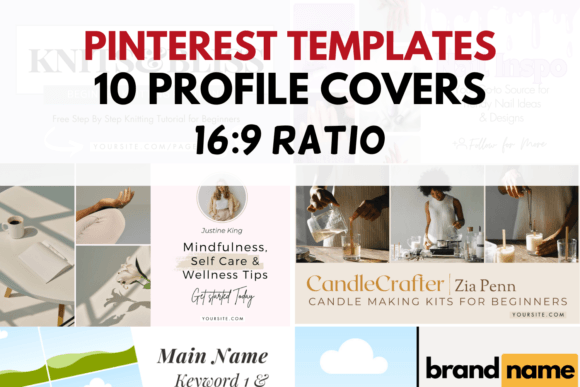
Optimize Your Profile with These Pinterest Cover Templates
Think of your Pinterest profile as your digital storefront. Before a visitor ever clicks on a pin or reads your bio, they see your cover image. It’s the wide banner at the top of your profile, and it’s the single most valuable piece of visual real estate you have on the platform. A blank, generic, or poorly chosen image is a missed opportunity. It’s a chance to immediately communicate your brand’s value, aesthetic, and purpose. Yet, so many creators and businesses let this space go to waste, using a random photo or, worse, the default Pinterest blue.
This is where having the right tools changes everything. We've developed a collection of 10 Pinterest Cover Editable Templates specifically for this purpose. These aren't just pretty pictures; they are strategic design assets. Each template is crafted as a premium font-driven design, using clean typography and balanced layouts to create immediate visual hierarchy. The style leans into modern typography—think clean sans serif font pairings with the occasional elegant script font accent. The overall appeal is one of polished professionalism, but with enough flexibility to feel personal and niche-specific. They are designed to be instantly recognizable and to convey authority the moment someone lands on your page.
Where These Templates Create the Most Impact
The true strength of these Pinterest Cover Templates lies in their versatility. They are built for the visual-first environment of social media graphics, but their applications extend far beyond a single platform. Consider the immediate need: a cohesive brand identity. Your cover image is the header of your entire Pinterest presence. Using one of these templates ensures that the first impression aligns perfectly with your pins, your website, and your overall brand perception. This consistency is what builds recognition and trust with your audience.
For entrepreneurs and small business owners, these templates are a direct path to professionalism. Instead of spending hours trying to design a cover from scratch in a tool like Canva, you start with a proven layout. The editable Canva template files mean you can easily swap out the placeholder text for your own keywords, tagline, and brand colors. This is practical for:
- Bloggers and Publishers: Use the space to showcase your blog's name and core topics, like "Sustainable Living Tips" or "Easy Weeknight Dinners." This immediately qualifies your profile for your target audience.
- Designers and Creatives: Treat the cover as a mini-portfolio header. The clean, graphic nature of the templates lets your work or your brand's personality shine without visual clutter.
- Product-Based Businesses: Feature your best-selling product category or a beautiful lifestyle shot that encapsulates your brand's world. The 1920 x 1080 px size is perfect for high-resolution imagery.
- Service Providers (Coaches, Consultants): Use the text overlays to state your value proposition clearly. A template that pairs a strong sans serif headline with a supporting script font can communicate both strength and approachability.
Think about the design principles at play. A well-chosen typeface influences readability, but here, it does more. The display font used in the headline of each template is chosen for its impact at a glance. It’s not meant to be read like a paragraph; it’s meant to be a visual anchor. The careful font pairing—perhaps a geometric sans serif with a flowing script—creates a dynamic visual hierarchy that guides the eye exactly where you want it to go: to your brand name and your core message.
Practical Guidance for Choosing and Using Your Template
Selecting the right template from the collection of 10 is your first creative decision. Don't just pick the one you think is prettiest. Evaluate it for project fit. Does the personality of the design match your brand? A template with bold, blocky letters suits a fitness brand or a tech blog, while one with delicate script accents might be perfect for a wedding planner or a stationery shop. Review the included styles; each template offers a different mood and layout structure.
Once you have your editable Canva template, the real customization begins. This is where you apply your brand identity. Start with your logo design. Place it strategically—often off to one side or integrated into the typography. Then, choose your brand colors. The templates are designed with neutral backgrounds or subtle gradients to make your colors pop. Don't just fill in the text boxes. Consider the entire composition. Is there enough breathing room? Does the text feel balanced against any graphical elements?
Testing is a non-negotiable step. Before you finalize, preview your cover image on both desktop and mobile. Pinterest’s interface crops the image differently on a phone, so ensure your most critical information—the top line of text or your logo—isn’t cut off. Check readability. Your chosen headline font needs to be legible at a smaller scale in the Pinterest feed preview. A complex handwritten font might look beautiful up close but become an unreadable squiggle when viewed as a small thumbnail.
Finally, think beyond the initial use. These design assets are yours to adapt. The core layout and typography can inspire your other social media graphics, newsletter headers, or even elements of your web design. By starting with a strong, professional foundation from these Pinterest Cover Templates, you’re not just fixing one image; you’re investing in a visual language that elevates your entire brand’s digital presence, drives engagement, and makes your profile a destination, not just another pin in the feed.